Hover Prompt by Digisync
You talk.
It follows.
The teleprompter that listens. Hover Prompt follows your voice word by word, so you can look into the lens and speak at your own pace, whether you're recording a video, joining a call, or giving a presentation.
There's no scroll speed to set and nothing to keep up with. Slow down and it slows with you. Pause to take a breath, and it waits. It runs alongside the camera or app you already use, on iPhone, iPad, and Mac.
Coming soon to the App Store.
Try it free with the demo script, then unlock it once for $9.99 on iPhone, iPad, and Mac. Launch price for the first 1,000 buyers.

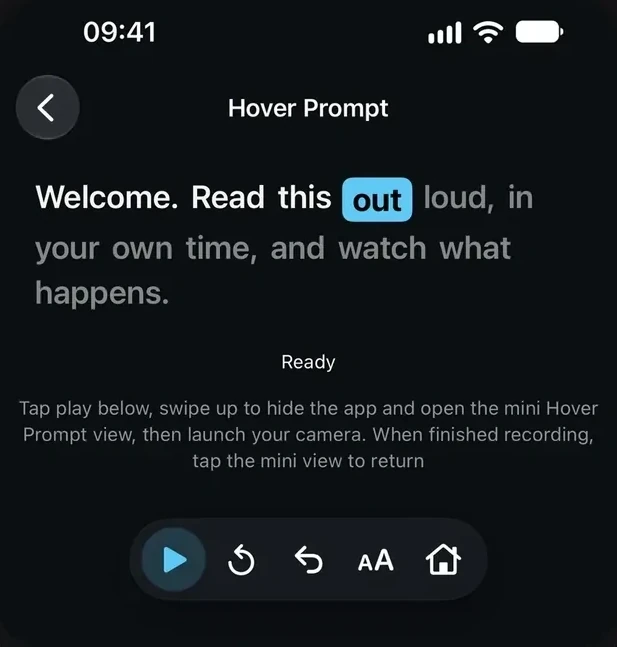
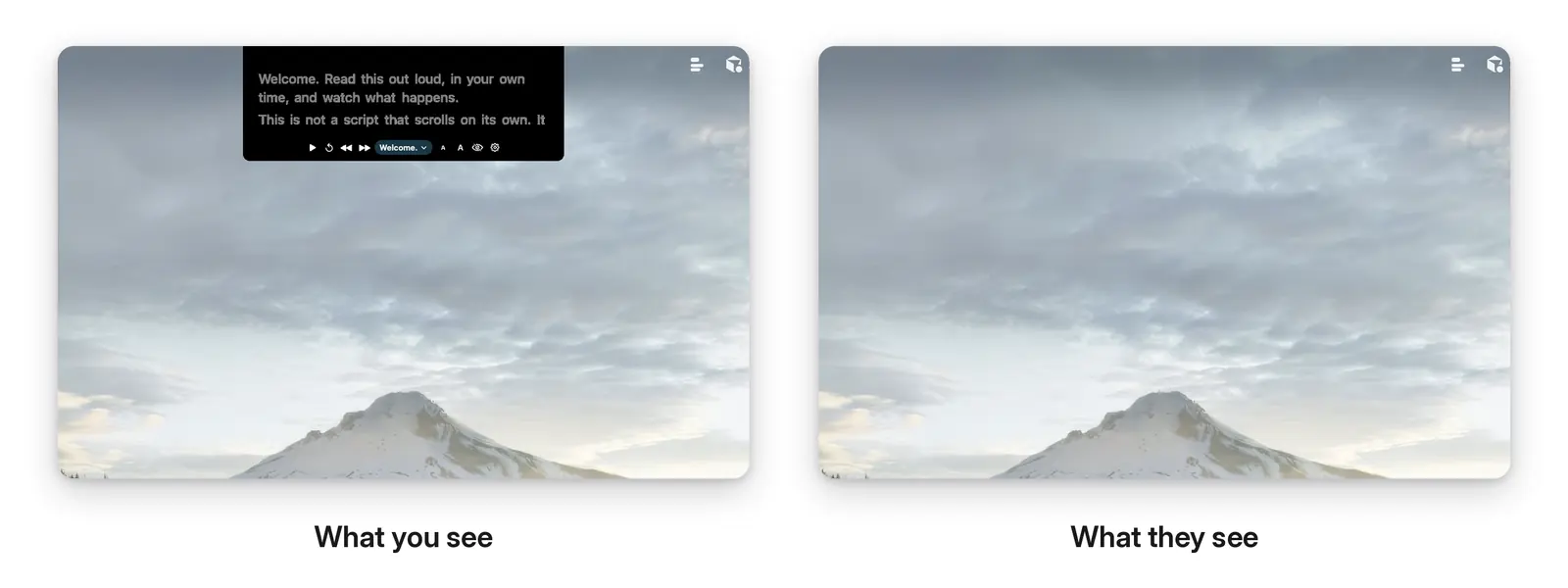
Welcome. Read this out loud, in your own time, and watch what happens. This is not a script that scrolls on its own. It listens as you speak, and the highlight follows the words you say.
Made for
- YouTubers and course creators
- Coaches and consultants posting on LinkedIn
- Sales teams recording personal video messages
- Remote teams presenting in meetings
- Teachers recording lessons
- Speakers who livestream
- Founders recording pitch videos
Most teleprompters make you keep up with them.
A scrolling teleprompter moves at one speed, but you don't. The text races ahead when you slow down for emphasis and drags when you hit your stride. Before long your eyes are off the lens, hunting for your place.
It loses you
The moment you ad-lib, stumble, or pause, the scroll keeps going without you.
You can hear it
You start reading instead of talking. You sound stiff, you know it, and you stop for another take.
It should follow you
You're the one with something to say. The script should follow you, not the other way around.
Why we built it
Built to keep up with you.
Talking to a camera is hard enough without chasing a scroll bar. We built Hover Prompt so the speaker sets the pace, not the prompter.
As you speak, Apple's on-device speech recognition matches your words to your script and highlights where you are. Names and unusual words in your script are passed to it as hints, so they're recognized more reliably. Skip a line or speed up, and it finds you again.
There's no account to create. Your scripts stay on your device, and your voice is never recorded, saved, or sent anywhere. The only thing that leaves your device is anonymous usage stats, and you can turn those off in Settings.
How it works
Up and running in three steps.
-
1
Download Hover Prompt
Install it on your iPhone, iPad, or Mac.
-
2
Add your script
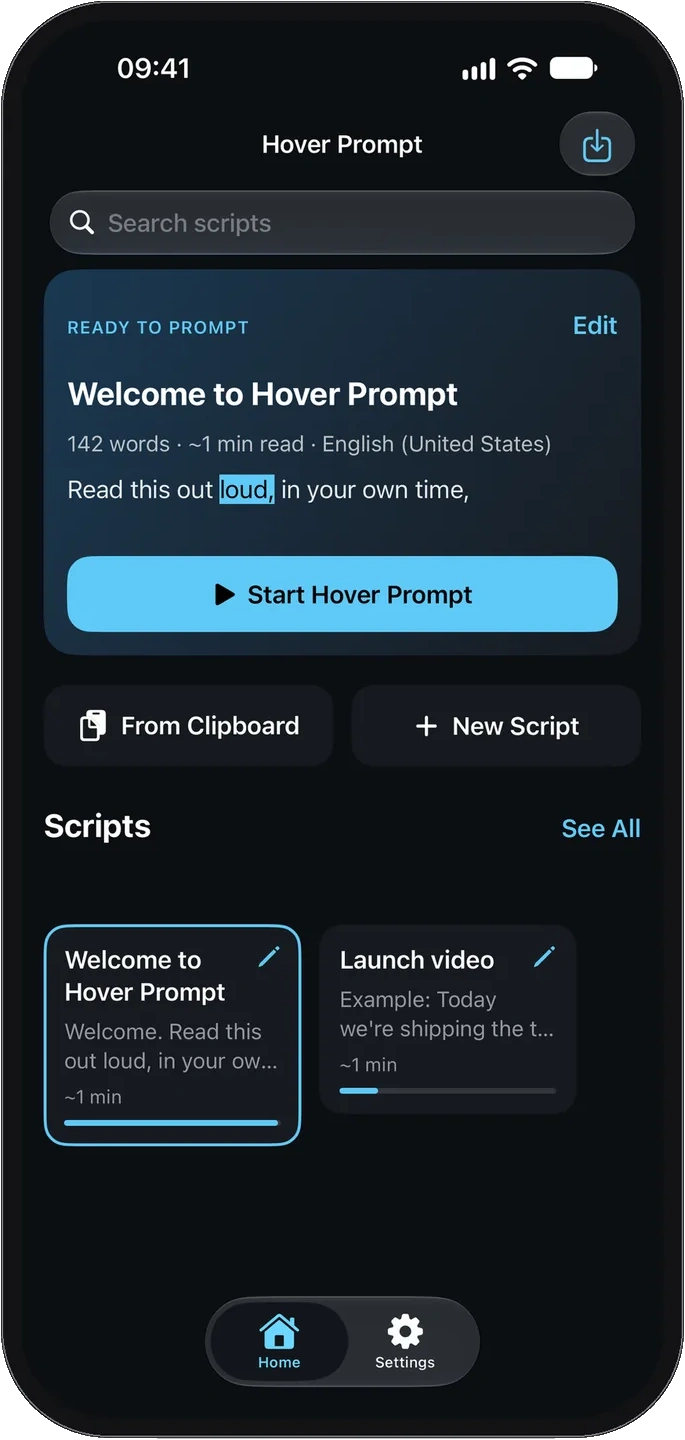
Paste it in, type a new one, or import a file: .txt, .md, or .rtf on iPhone and iPad, plus .docx on Mac. The free demo script is already there.
-
3
Press play and talk
The word you're saying lights up and the script moves with you. Stop talking, and it stops too.
Before you buy
- No sign-up. You won't be asked to create an account.
- Private by design. Your script and your voice stay on your device.
- Try before you pay. Voice sync works fully on the demo script, so you can see it for yourself.
- iPhone with iOS 17 or later
- iPad with iPadOS 17 or later
- Mac with macOS 13 Ventura or later
Try it free.
Unlock it when you're ready.
The demo script is free and works fully. Read it out loud and watch the highlight keep pace with you. When you want to use your own scripts, unlock Hover Prompt with a one-time purchase.
iPhone and iPad
Your script, right beside the lens.
Press Play, then open the Camera app or whichever app you record with. Your script floats in a small Picture-in-Picture window that you can drag right up to the lens, so your eyes stay where your audience is. It only shows while you're reading.
Hover Prompt doesn't record anything itself, so you keep using the camera app you already know. A small green mic meter shows that it can hear you.
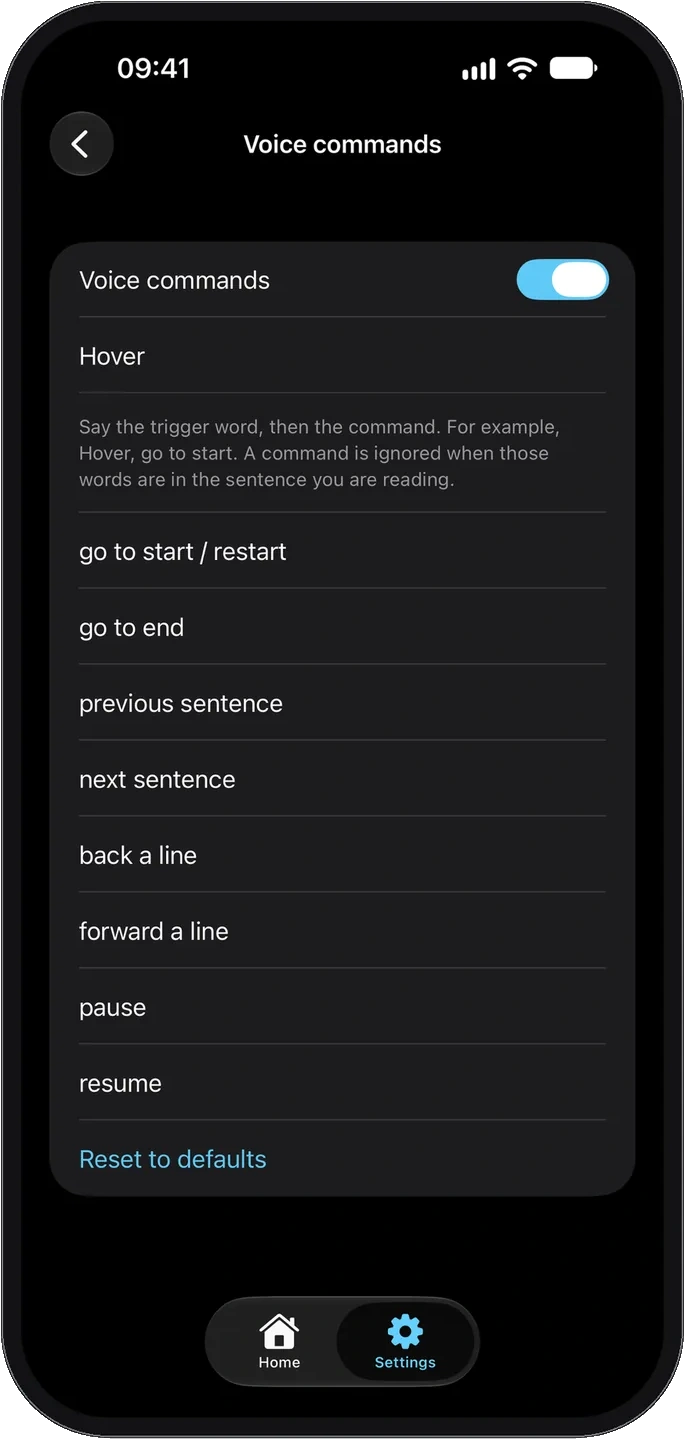
Hands full? Just say "Hover."
Steer your script by voice. Say "Hover," then a command such as "pause," "resume," "next sentence," or "go to start." That keeps your hands free for your phone, your notes, or the product you're showing. You can change the trigger word and the phrases in Settings. Voice commands work on iPhone and iPad.
Mac
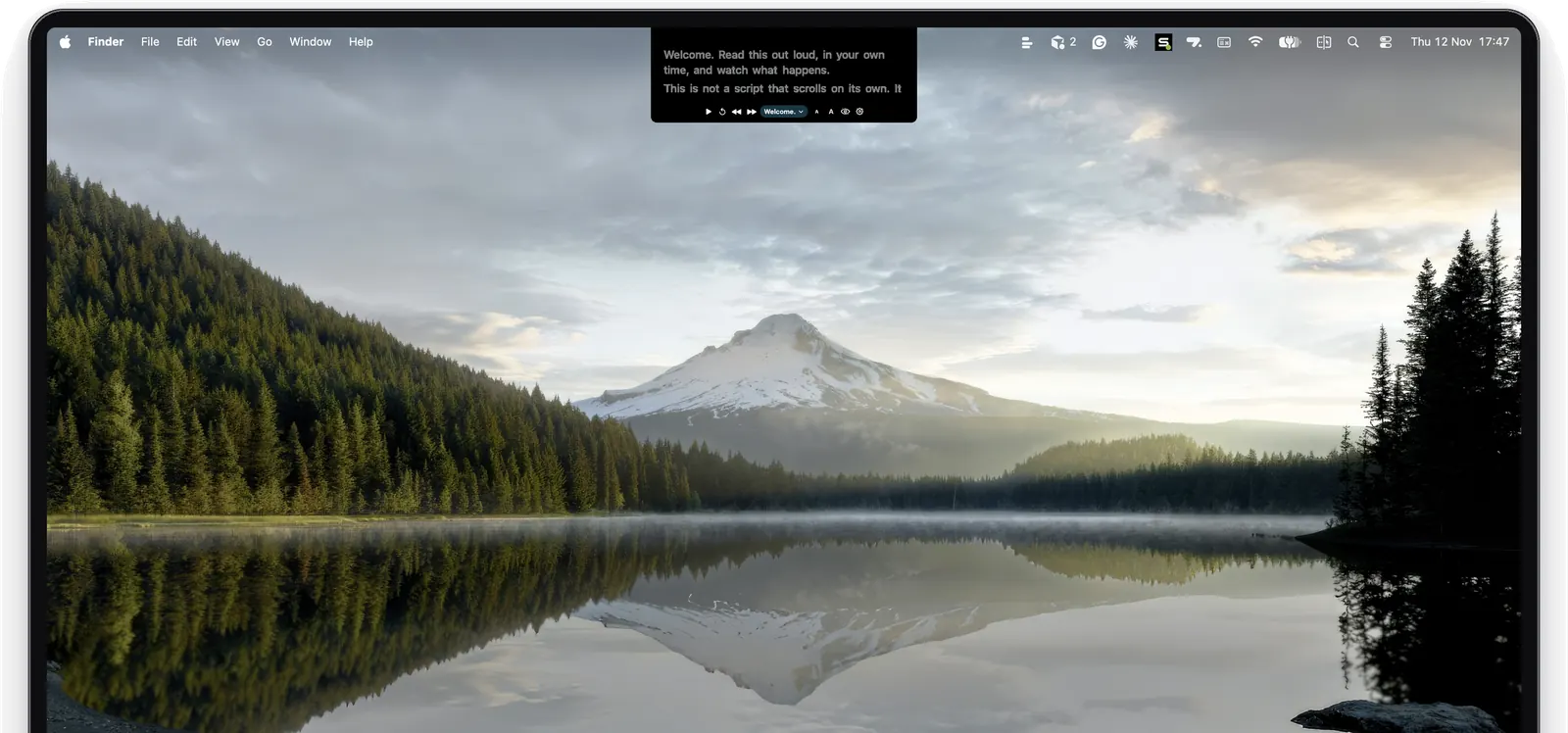
Your script sits right under your camera.
On a MacBook with a notch, Island mode tucks your script just beneath it, close to the camera, so you can read and still look your audience in the eye. On other Macs, or on an external display, Classic mode shows it as a small floating card under the menu bar. Hover over the script to bring up Play and the other controls. It stays out of your way in the menu bar, with no Dock icon.
Keyboard shortcuts
Stay in your call or recording app and steer the script from the keyboard. Speech tracking keeps running even when the prompter is hidden.
- Hide or show: Control-Option-Command-H
- Restart from the top: Control-Option-Command-R
- Jump back a sentence: Control-Option-Command-B
- Jump forward a sentence: Control-Option-Command-N
Visible to you. Hidden from your audience.
Hover Prompt tries to keep itself out of screen shares and recordings, so on a call you can see your notes and the people you're sharing with can't. This is always on, but it's best effort. Some apps and newer versions of macOS still capture it, so do a quick test recording before an important call.
Make it yours
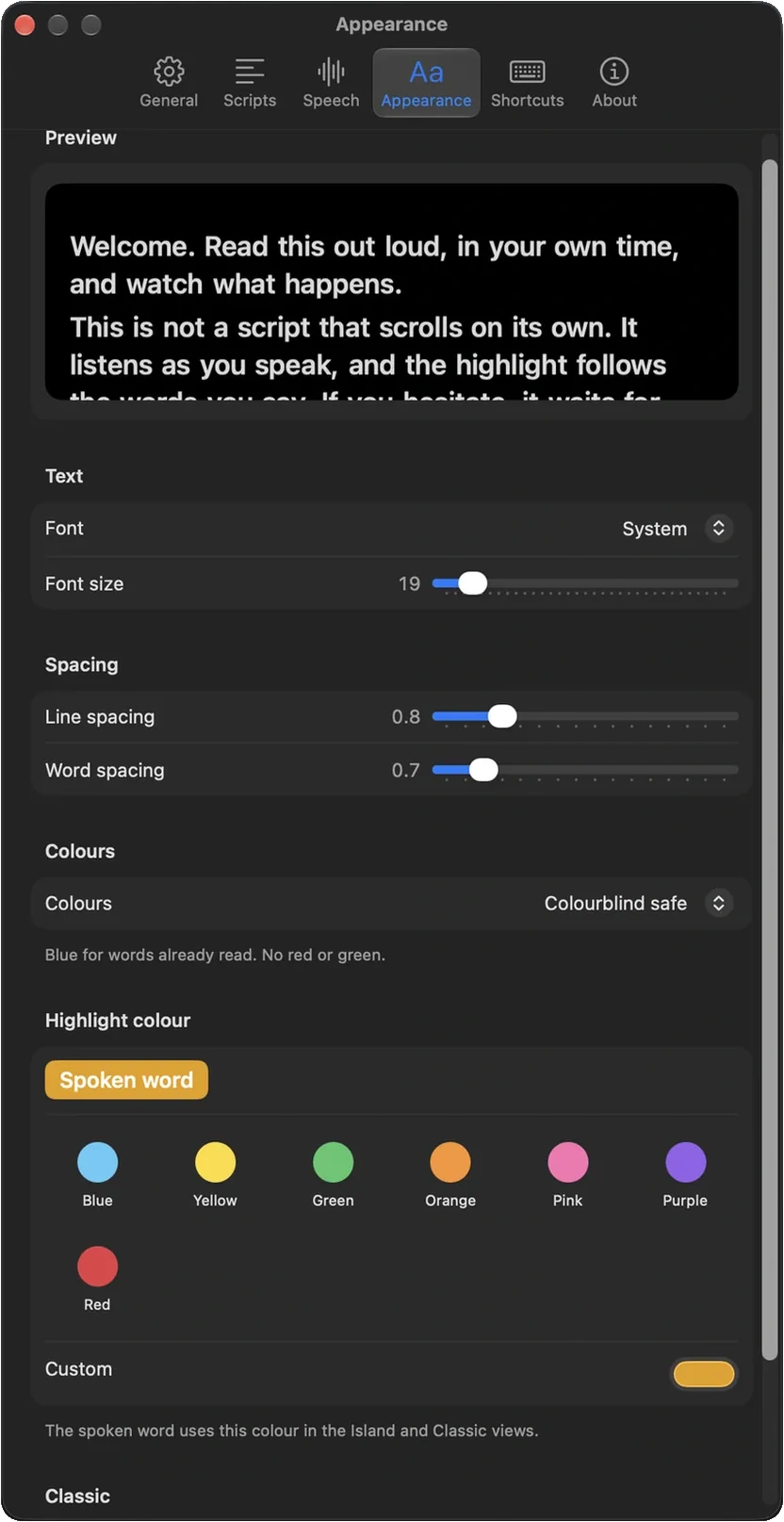
Set it up the way you read best.
Choose a highlight color from the presets or pick your own. Adjust the font, size, and spacing, and see each change in a live preview.
Keep all your scripts in one library and switch between them in a tap. On iPhone and iPad, your recent scripts are on the Home screen. On Mac, they're in Settings, under Scripts.
What a runaway scroll costs you
Takes that sound read rather than said. Eyes that keep darting down to find your place. Hours in the edit stitching together the one version that works, and the feeling that you come across better in person than on camera.
Look up. Speak naturally. Get it in one take.
With Hover Prompt, you set the pace. The highlight stays on the word you're saying, your eyes stay on the lens, and you sound like yourself: relaxed, confident, and finished sooner.
Fewer retakes, less editing
It waits when you pause and catches up when you skip, so one stumble doesn't mean starting over. Fewer takes also means less footage to sort through later.
Eye contact that connects
Your script sits next to the camera, so your audience sees you looking at them, not at your notes.
Simple from the first take
It does one job and does it well. No studio software to learn and no account.
Try it free, then unlock it once.
$9.99 one-time · iPhone, iPad, and Mac
The built-in demo script, "Welcome to Hover Prompt," is free, and voice sync works on it fully. To create, paste, import, or edit your own scripts, unlock Hover Prompt once for $9.99. This launch price is only for the first 1,000 buyers.
The demo stays playable either way.
Questions
How much does Hover Prompt cost?
Downloading it and using the demo script is free. To work with your own scripts, unlock it with a one-time purchase of $9.99. That's the launch price for the first 1,000 buyers, and it covers iPhone, iPad, and Mac.
Where do my script and my voice go?
Nowhere. Your scripts are stored on your device. Speech recognition runs on your iPhone, iPad, or Mac and never falls back to a server. Your voice isn't recorded, saved, or sent anywhere, and you don't need an account. The only data that leaves your device is anonymous usage stats, which never include your scripts or voice, and you can turn them off in Settings. Purchases go through Apple. You'll find the full details in our privacy policy.
Which devices does it run on?
iPhone with iOS 17 or later, iPad with iPadOS 17 or later, and Mac with macOS 13 Ventura or later. On iPhone and iPad, allow Microphone and Speech Recognition access, turn on Dictation, and choose a language that has an on-device speech model. On Mac, turn on Dictation in System Settings, under Keyboard. Our support page walks through each step.
Does it work offline?
Yes. Once you've downloaded the on-device speech model, reading and voice sync work without a connection. You only need the internet to buy the app and to send anonymous usage stats, if you leave them on.
Does it work with Zoom, Teams, or my recording app?
On Mac, the prompter floats above any app. On iPhone and iPad, it sits in a Picture-in-Picture window over Camera or whichever app you record with.
What if I go off-script?
Ad-lib as much as you like. When you come back to your script, Hover Prompt finds your place again.
Your next take
could be the one.
Try the free demo today. Then unlock Hover Prompt once for $9.99 on iPhone, iPad, and Mac.
Coming soon to the App Store.